Beginner2h 44m

Full Stack Notes App with MERN Stack

Build a full-stack Notes application from scratch using MongoDB, Express, React, and Node.js. Includes JWT authentication, note creation, editing, pinning, and a live search feature — perfect for developers learning the MERN stack end-to-end.
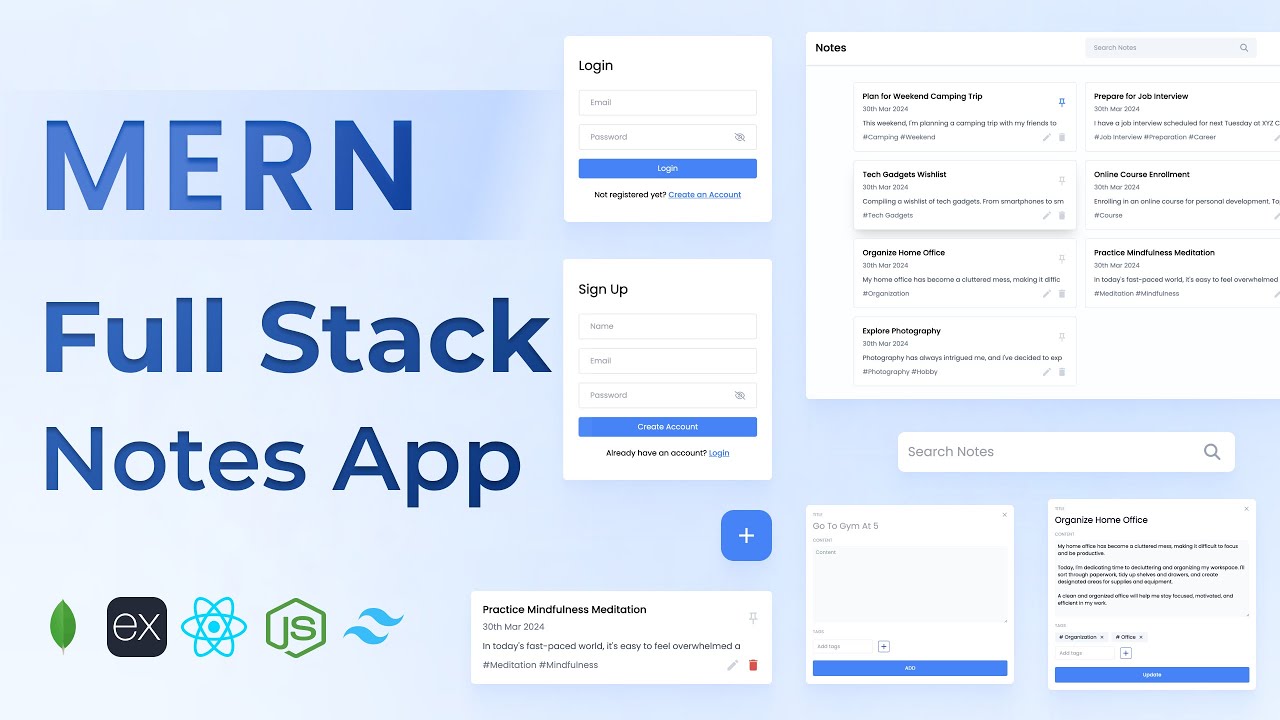
MongoDBExpressReactNode.jsJWTTailwind

What You'll Build

User signup & login with JWT auth
Create new notes with title, content & tags
Edit existing notes via popup modal
Delete notes with empty state handling
Pin important notes to the top
Live search across all your notes
Toast notification feedback system
Protected routes — notes are private per user

What You'll Learn

Setting up a MERN stack project from scratch
Building a REST API with Express & MongoDB
JWT authentication — signup, login, token verification
Mongoose models and schema validation
React component architecture for CRUD apps
Axios instance setup with auth headers
Tag input and reusable component patterns
Toast message component from scratch

Video Chapters

0:00Demo of Notes AppChapter 1
3:12Frontend React app setupChapter 2
5:38Tailwind CSS setupChapter 3
7:35React Router DOM installation & setupChapter 4
9:48Login screen UIChapter 5
14:15Password input componentChapter 6
22:02Sign up page UIChapter 7
27:20Navbar profile cardChapter 8
31:42Search bar componentChapter 9
36:25Note card componentChapter 10
43:47Add / Edit note popupChapter 11
49:38Tag input componentChapter 12
1:03:28Backend Node + Express project setupChapter 13
1:06:50MongoDB Atlas configurationChapter 14
1:09:41JWT token authentication utilityChapter 15
1:10:44User schema with MongooseChapter 16
1:12:00MongoDB connectionChapter 17
1:13:43Create account APIChapter 18
1:19:09Login APIChapter 19
1:22:47Add new note APIChapter 20
1:28:31Edit note APIChapter 21
1:33:23Get all notes APIChapter 22
1:35:08Delete note APIChapter 23
1:38:39Pin notes APIChapter 24
1:43:19Get user APIChapter 25
1:47:04Axios instance utility functionChapter 26
1:49:10Login API integrationChapter 27
1:54:02Get user API integrationChapter 28
1:57:36Create account API integrationChapter 29
2:01:02All notes API integrationChapter 30
2:07:24Add new note API integrationChapter 31
2:12:19Edit note API integrationChapter 32
2:14:44Toast message componentChapter 33
2:25:01Delete note API integrationChapter 34
2:28:00Empty state — no notes cardChapter 35
2:31:48Search API (backend)Chapter 36
2:36:13Search API integration (frontend)Chapter 37
2:40:52Pin note API integrationChapter 38

Tech Stack

MongoDBStores user accounts and notes as flexible documents with Mongoose schemas.
ExpressPowers the REST API with routes for auth, notes CRUD, pin toggling, and search.
ReactHandles the UI — note cards, modal editor, search bar, toast messages, and pin toggling.
Node.jsServer runtime that runs the Express API and connects to MongoDB Atlas.
JWTSecures all API routes; tokens are verified via a custom auth utility function.
TailwindUtility classes for a clean, responsive layout built without writing custom CSS.
💬

Frequently Asked Questions

Is this project suitable for complete beginners?

Yes — this is designed as a first MERN project. Basic JavaScript knowledge is enough. Every line of code is explained step by step across the 2h 41m tutorial.

What is included in the source code?

You get the full client (React + Vite) and server (Express + MongoDB) folders, a .env.example file with all required variables, and a README with local setup instructions.

Do I need to pay for any service to run this project?

No. MongoDB Atlas has a free tier that is more than enough for this project.

Can I use this as a portfolio project?

Absolutely. It covers auth, protected routes, full CRUD, search, and pin logic — core concepts every hiring manager looks for in a full-stack developer portfolio.

What libraries are used on the frontend?

React 18 with Vite, React Router v6 for navigation, Axios for API calls, and Tailwind CSS for styling. No heavy UI libraries — all components are built from scratch.