Intermediate5h 04m

Full Stack AI-Powered eBook Creator App with MERN Stack

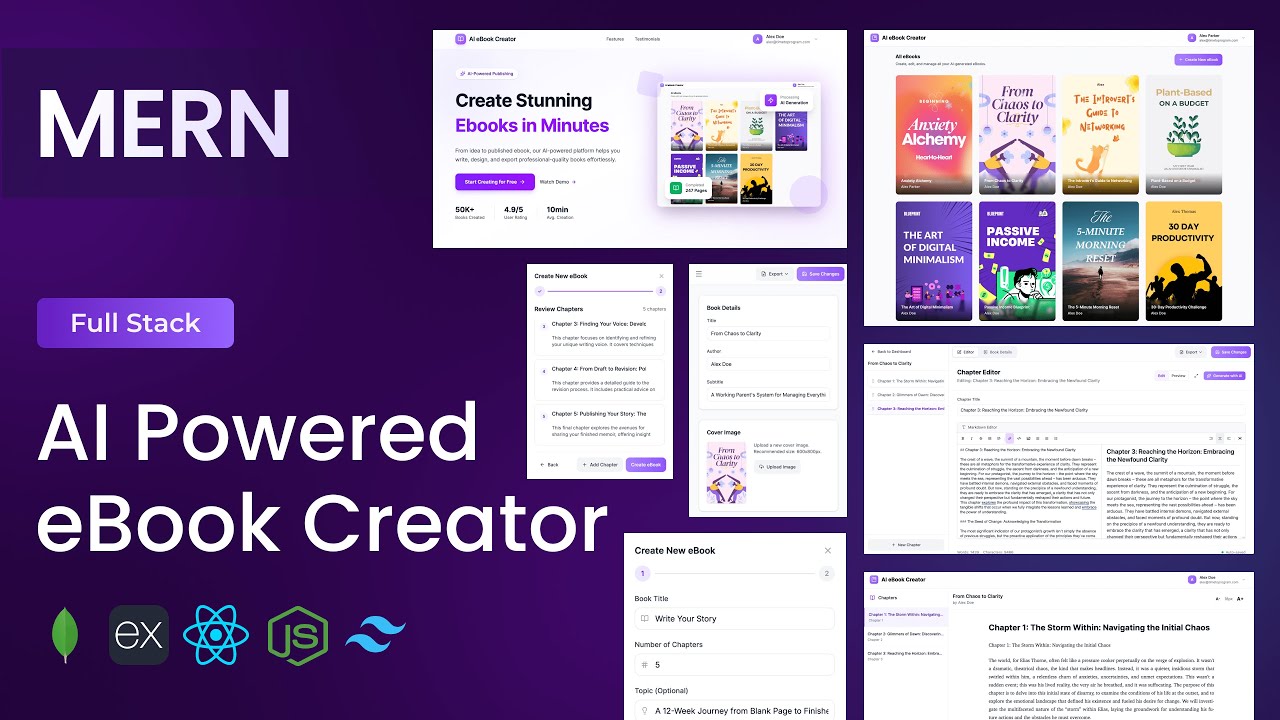
Build a full-stack AI-powered eBook Creator application using MongoDB, Express, React, and Node.js. Uses Google Gemini AI to generate complete ebook outlines and full chapter content from a title alone. Features a markdown editor with real-time preview, drag-and-drop chapter reordering, custom cover image upload, and PDF and DOCX export — a genuinely useful content creation tool built entirely from scratch with the MERN stack.
MongoDBExpressReactNode.jsJWTGemini APITailwind

What You'll Build

User login & sign-up with JWT authentication
Dashboard with ebook grid — view, edit, and delete ebooks
Create ebook popup modal with title and initial setup
AI outline generator — create full chapter structure from a book title
AI chapter writer — generate complete markdown chapter content with Gemini
Markdown editor with real-time edit / preview mode toggle
Drag-and-drop chapter reordering for flexible ebook structure
Book meta details tab — title, subtitle, author name
Custom cover image upload and preview
Export ebook as PDF with one click
Export ebook as Word (DOCX) file
View ebook page with formatted content rendering
Profile management — update user details
Landing page with navbar, hero, features, testimonials, and footer
Fully responsive across desktop, tablet, and mobile

What You'll Learn

MERN stack project setup with Tailwind CSS v4.1
JWT auth with Express auth middleware and React Auth Context
Designing a MongoDB book schema with nested chapter arrays
Two Gemini AI integrations — outline generation and chapter writing
Markdown editor with live preview toggle in React
Drag-and-drop list reordering in React
Server-side PDF generation and file streaming from Express
Server-side DOCX generation and file download from Express
Cover image upload with Express and real-time React preview
Multi-tab editor layout — content editor and meta details
Dashboard grid with ebook card components
Landing page design with testimonials section from scratch

Video Chapters

0:00Demo of AI-Powered eBook Creator AppChapter 1
9:47Setting up React appChapter 2
12:35Configuring Tailwind CSS v4.1Chapter 3
15:40Creating project structure — files & foldersChapter 4
17:41Defining app routesChapter 5
23:16Backend setup & project structureChapter 6
27:12Connecting to MongoDBChapter 7
29:55Creating User schemaChapter 8
31:43Creating Book schemaChapter 9
34:25Authentication APIs — login, signup, get profile info, update userChapter 10
45:47eBook APIs — create, read, update, delete eBooksChapter 11
58:28AI APIs — generate eBook outline, generate chapter contentChapter 12
1:06:52Export APIs — export as PDF or Word documentChapter 13
1:49:45Navbar componentChapter 14
2:00:49Hero sectionChapter 15
2:11:23Features sectionChapter 16
2:20:05Testimonials sectionChapter 17
2:28:33Footer componentChapter 18
2:42:28Login pageChapter 19
2:54:21Sign-up pageChapter 20
3:00:51Dashboard pageChapter 21
3:21:47Create eBook popup modalChapter 22
3:44:58eBook editor pageChapter 23
4:33:32eBook meta details tabChapter 24
4:40:22View eBook pageChapter 25
4:59:59Profile pageChapter 26

Tech Stack

MongoDBTwo-schema architecture — users and books — where each book document stores title, subtitle, author, cover image, and an ordered array of chapter objects with markdown content.
ExpressPowers the REST API — auth, full ebook CRUD, two AI generation endpoints, and PDF/DOCX export endpoints that stream the generated file back to the client.
ReactDrives the ebook editor — markdown editor with edit/preview toggle, drag-and-drop chapter list, meta details tab, cover image upload, and dashboard grid.
Node.jsServer runtime handling API requests, MongoDB connection, Gemini API proxy calls, and server-side PDF and Word document generation for export.
JWTSecures all protected routes via auth middleware; user session is managed globally in React via Auth Context.
Gemini APITwo AI integrations — generate a complete ebook outline (chapter titles and descriptions) from a book title, and write full markdown chapter content on demand.
TailwindTailwind CSS v4.1 used across the landing page, dashboard grid, ebook editor, meta details tab, and all authentication and profile pages.
💬

Frequently Asked Questions

How does the AI outline generator work?

You enter your ebook title and click Generate Outline. The Express backend sends the title to Gemini with a prompt instructing it to return a structured list of chapter titles and short descriptions. These are saved as chapter objects in your MongoDB book document — ready to expand with the chapter writer.

How does the AI chapter writer work?

For any chapter in your outline, you can click Generate Content. The chapter title and book context are sent to Gemini, which returns fully written markdown content. This populates the markdown editor for that chapter — you can edit, expand, or publish it as-is.

How does the PDF and DOCX export work?

Both exports are generated server-side in Express using Node.js document libraries. The backend assembles the full ebook content, generates the file, and streams it back to the browser as a download — no client-side generation or third-party SaaS needed.

How does the drag-and-drop chapter reordering work?

The chapter list uses a React drag-and-drop implementation. When you drop a chapter in a new position, the updated order is saved to MongoDB via the update ebook API — so the order persists across sessions.

What prior knowledge do I need?

Intermediate MERN experience is recommended. If you have completed the AI Interview Prep App or Invoice Generator, the auth, context, and Gemini integration sections will feel familiar. The markdown editor, drag-and-drop, and export features are explained from scratch.

What is included in the source code?

You get the full React frontend, Express backend, Mongoose schemas for users and books, all AI and export utility functions, a .env.example with all required keys, and a README with local setup and deployment instructions.