Intermediate5h 08m

Full Stack AI-Powered Invoice Generator with MERN Stack

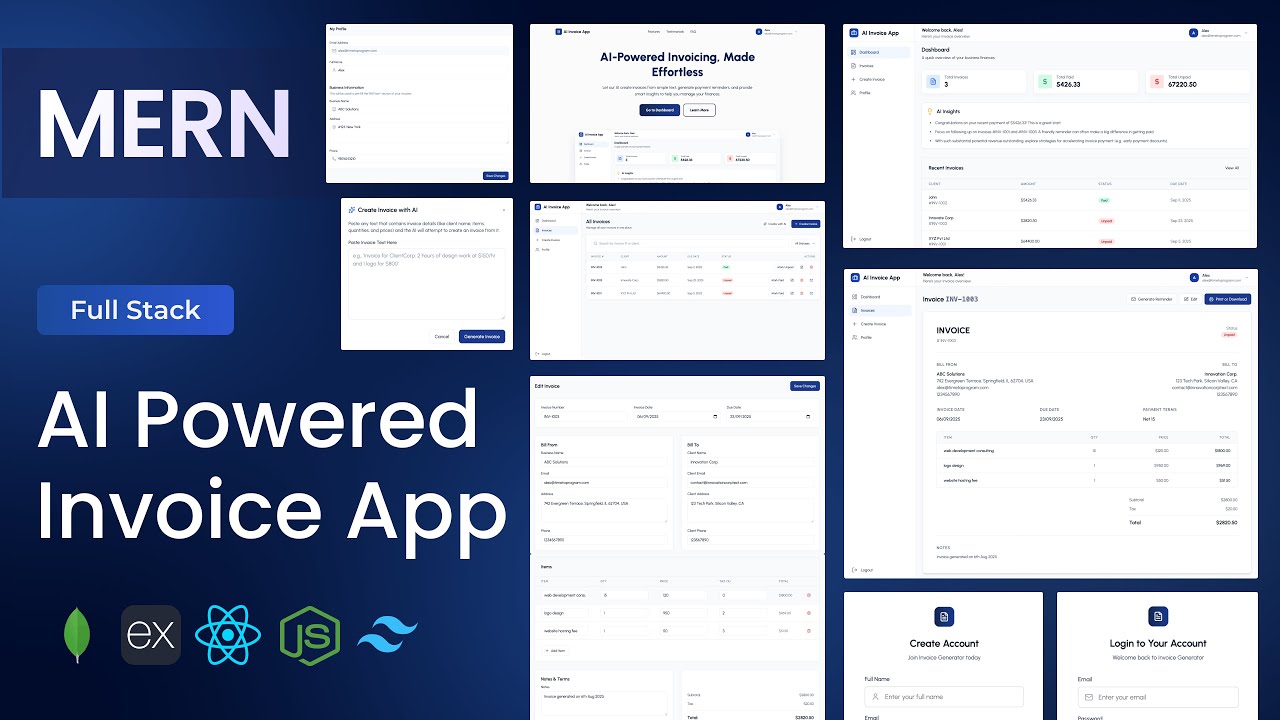
Build a full-stack AI-powered Invoice Generator application using MongoDB, Express, React, and Node.js. Features Gemini AI to generate invoices instantly from plain text client emails, auto-draft professional payment reminder emails, and deliver smart financial insights on the dashboard. Includes JWT authentication, full invoice CRUD with status filtering, PDF print and download, and business profile auto-fill — a production-quality freelancer tool built from scratch.
MongoDBExpressReactNode.jsJWTGemini APITailwind

What You'll Build

User login & sign-up with JWT authentication
AI invoice creation — generate a structured invoice from a plain-text client email
AI payment reminder — auto-draft professional reminder emails for unpaid invoices
AI insights dashboard — smart financial analytics powered by Gemini
Create, edit, and delete invoices manually
Filter invoices by payment status (paid, unpaid, overdue)
Invoice detail page with full line-item breakdown
Update invoice payment status with one click
Print and download invoices as PDF
Business profile management for auto-filled invoice details
Landing page with header, hero, features, testimonials, FAQ, and footer
Reusable form input UI components across the app
Fully responsive across desktop, tablet, and mobile

What You'll Learn

MERN stack project setup with Tailwind CSS v4.1
JWT auth with dedicated Express auth middleware
Designing a flexible MongoDB invoice schema with status tracking
Three Gemini AI integrations — invoice parsing, email generation, financial insights
Parsing unstructured plain text into structured invoice data with AI
PDF print and download implementation from a React component
Building reusable form input components for complex forms
Invoice status filter UI and backend filter query design
Auth Context pattern for global session state in React
Landing page design with testimonials and FAQ sections
Business profile auto-fill pattern for form pre-population

Video Chapters

0:00Demo of AI-Powered Invoice Generator AppChapter 1
5:32Setting up the React appChapter 2
7:27Configuring Tailwind CSS v4.1Chapter 3
11:09Creating project structure — files & foldersChapter 4
13:34Defining app routesChapter 5
18:59Header componentChapter 6
37:44Hero sectionChapter 7
44:14Features sectionChapter 8
48:47Testimonials sectionChapter 9
53:33FAQ sectionChapter 10
58:26Footer componentChapter 11
1:04:46Backend setup & project structureChapter 12
1:08:58Connecting to MongoDBChapter 13
1:12:21Creating User schemaChapter 14
1:14:10Creating Invoice schemaChapter 15
1:16:21Creating auth middlewareChapter 16
1:18:27Authentication APIs — login, signup, get profile infoChapter 17
1:28:30Invoice APIs — create, get all, get by ID, update, deleteChapter 18
1:39:45AI APIs — create invoice with AI, generate reminder email, dashboard insightsChapter 19
1:53:46Defining API endpointsChapter 20
1:54:05Creating Axios instanceChapter 21
1:56:00Setting up Auth ContextChapter 22
2:00:33Creating the login pageChapter 23
2:17:59Creating the sign-up pageChapter 24
2:46:52Creating dashboard layoutChapter 25
3:01:27Dashboard pageChapter 26
3:10:38Dashboard recent invoices sectionChapter 27
3:16:10Dashboard AI insights cardChapter 28
3:21:34Create invoice pageChapter 29
3:27:54Creating reusable form input UI componentsChapter 30
3:53:38All invoices pageChapter 31
4:16:13Delete invoice functionChapter 32
4:17:06Update invoice payment status functionChapter 33
4:18:53Create invoice with AI componentChapter 34
4:26:02Generate payment reminder email componentChapter 35
4:34:01Invoice detail pageChapter 36
4:54:28Implementing print / download invoice as PDFChapter 37
4:58:04Profile info pageChapter 38

Tech Stack

MongoDBTwo-schema architecture — users and invoices — with status-based filtering and per-user data isolation for a clean multi-tenant invoice system.
ExpressPowers the REST API — auth, full invoice CRUD, status updates, and three distinct AI endpoints for invoice creation, reminder emails, and dashboard insights.
ReactDrives the dashboard, invoice listing with filters, create/edit forms with reusable input components, invoice detail view, and the AI-powered panels.
Node.jsServer runtime handling API requests, MongoDB connection, auth middleware, and secure Gemini API proxy calls from the backend.
JWTSecures all protected routes via a dedicated auth middleware; user session is managed globally in React via Auth Context.
Gemini APIThree AI integrations — parse plain-text client emails into structured invoices, generate professional payment reminder emails, and produce dashboard financial insights.
TailwindTailwind CSS v4.1 used across the landing page, dashboard layout, invoice forms, detail view, and all reusable UI input components.
💬

Frequently Asked Questions

How does the AI invoice creation from plain text work?

You paste a plain-text client email or brief into the AI invoice component. The Express backend sends this to Gemini with a structured prompt instructing it to extract client name, line items, amounts, and due date. The returned JSON is mapped directly into the invoice creation form — ready to review and save.

How does the AI payment reminder email work?

On any unpaid invoice, the Generate Reminder Email component sends the invoice details to the Gemini API via the Express backend. Gemini returns a professionally worded reminder email you can copy and send to your client — no manual drafting needed.

How is the PDF download implemented?

The invoice detail page is styled to be print-friendly. The print/download function uses the browser's native print API triggered from React, producing a clean PDF without a third-party library. This is covered step by step at 4:54:28.

What is the AI insights dashboard card?

The dashboard sends your invoice data summary to Gemini, which returns plain-language financial observations — such as overdue invoice trends, top clients by revenue, or cash flow patterns. These are displayed in a dedicated AI insights card on the dashboard.

What prior knowledge do I need?

Intermediate MERN experience is recommended. If you have completed the Expense Tracker or Interview Prep App, the auth, context, and API integration sections will feel familiar. The AI integration sections are explained from scratch.

What is included in the source code?

You get the full React frontend, Express backend, Mongoose schemas for users and invoices, all AI utility functions, reusable form components, a .env.example with all required keys, and a README with local setup and deployment instructions.