Advanced6h 43m

Full Stack AI-Powered Learning Assistant App with MERN Stack

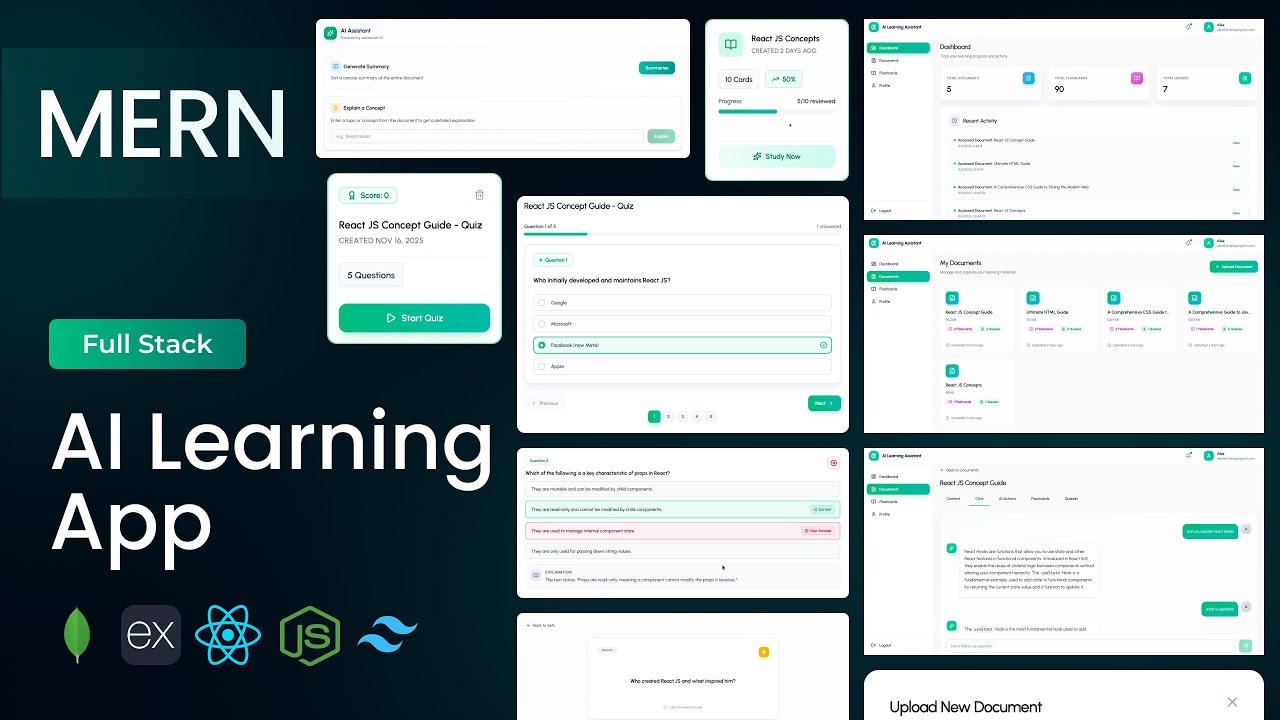
Build a full-stack AI-powered Learning Assistant application using MongoDB, Express, React, and Node.js. Upload PDF study documents and use Google Gemini AI to chat with your documents, generate summaries, explain concepts, auto-create flashcard sets with flip animation, and generate custom multiple-choice quizzes with results and analytics. Features a progress tracking dashboard, favorites system, embedded PDF viewer, and five MongoDB schemas — the most feature-complete AI project in the series at over 6 hours.
MongoDBExpressReactNode.jsJWTGemini APITailwind

What You'll Build

User login & registration with JWT authentication and password update
Upload, store, and manage PDF study documents with file size tracking
Embedded PDF viewer — read documents directly within the app
AI-powered document chat — ask context-aware questions about your PDFs
Persistent chat history per document
AI document summary — generate a concise summary with one click
AI concept explainer — get detailed explanations of specific topics
Auto-generated flashcard sets from document content with flip animation
Mark flashcards as favourites for quick review
Flashcard listing page with full management
AI quiz generator — create multiple-choice quizzes with configurable question count
Quiz take page with interactive question UI
Quiz results page — score breakdown, correct answers, and explanations
Progress tracking dashboard — total documents, flashcards, quizzes, and recent activity
Document details page with all AI features in tabs
Fully responsive across desktop, tablet, and mobile

What You'll Learn

MERN stack project setup with Tailwind CSS v4.1
Five-schema MongoDB design — users, documents, flashcards, quizzes, chat history
PDF file upload, storage, and deletion with Express
Embedded PDF viewer integration in React
Six Gemini AI integrations from a single backend
Document-context-aware AI chat with persistent history
Flashcard flip animation from scratch in React
Configurable AI quiz generation with question count parameter
Quiz submission, scoring, and results analytics
Favourites toggle system for flashcards
Progress tracking dashboard with aggregated MongoDB queries
API services layer pattern for clean frontend data fetching
Multi-tab document details page — chat, actions, flashcards, quizzes
Tailwind CSS v4.1 layout design for a complex multi-page app

Video Chapters

0:00Demo of AI Learning Assistant AppChapter 1
10:16Creating and setting up React appChapter 2
11:00Configuring Tailwind CSS v4.1Chapter 3
12:28Creating project structure — files & foldersChapter 4
15:49Defining app routesChapter 5
20:25Backend setup & project structureChapter 6
27:22Connecting to MongoDBChapter 7
30:42Authentication APIs — login, register, get profile, update passwordChapter 8
35:18Creating database schemas — user, document, flashcard, quiz, chat historyChapter 9
56:04Document APIs — upload, get, deleteChapter 10
1:14:53Flashcard APIs — get, review, toggle favourite, deleteChapter 11
1:23:25AI APIs — flashcards, quiz, summary, chat, concept explainer, chat historyChapter 12
1:49:50Quiz APIs — get all, get by ID, submit, get results, deleteChapter 13
2:01:39Dashboard overview APIChapter 14
2:09:05Defining API servicesChapter 15
2:18:31Login pageChapter 16
2:30:42Register pageChapter 17
2:46:35Dashboard pageChapter 18
3:12:20Document listing pageChapter 19
3:21:51Document card componentChapter 20
3:32:09Upload document modalChapter 21
3:45:15Document details pageChapter 22
3:56:57AI chat interfaceChapter 23
4:16:20AI actions tab — summary & concept explainerChapter 24
4:32:52Flashcards tabChapter 25
4:53:44Flashcard viewer component with flip animationChapter 26
5:07:24Quizzes tabChapter 27
5:30:28Quiz take pageChapter 28
5:48:47Quiz results pageChapter 29
6:08:21Flashcard listing pageChapter 30
6:30:28Profile pageChapter 31

Tech Stack

MongoDBFive-schema architecture — users, documents, flashcards, quizzes, and chat history — the most complex data model in the series, designed for a multi-feature learning platform.
ExpressPowers the full REST API — auth, document upload/delete, flashcard management, six distinct AI endpoints, quiz submission and results, and a dashboard analytics overview.
ReactDrives the entire platform — dashboard, document listing, embedded PDF viewer, AI chat interface, AI actions tab, flashcard viewer with flip animation, quiz UI, and results page.
Node.jsServer runtime handling all API requests, MongoDB connection, PDF file storage, and secure Gemini API proxy calls for all six AI features.
JWTSecures all protected routes including password update; user session is managed globally in React via API services layer.
Gemini APISix AI integrations — document-aware chat, document summary, concept explainer, flashcard generation, quiz generation with configurable question count, and chat history retrieval.
TailwindTailwind CSS v4.1 used across all pages — dashboard, document viewer, AI chat interface, flashcard flip animation, quiz UI, and results breakdown.
💬

Frequently Asked Questions

How does the AI document chat work?

When you upload a PDF, its text content is extracted and stored. When you ask a question in the chat interface, your message and the relevant document context are sent to the Gemini API via the Express backend. Gemini returns a context-aware answer, and the conversation is saved to the chat history schema in MongoDB so it persists across sessions.

How are the flashcards generated automatically?

The AI flashcard generator sends your document content to Gemini with a prompt instructing it to return a structured set of question-and-answer pairs. These are saved as flashcard documents in MongoDB linked to your study document. The flashcard viewer renders them with a CSS flip animation built from scratch.

How does the configurable quiz generation work?

You choose the number of questions before generating a quiz. This count is passed to the Express backend, which includes it in the Gemini prompt. Gemini returns exactly that many multiple-choice questions with four options and a correct answer — all saved to MongoDB for the quiz taking and results flow.

What makes this the most advanced AI project in the series?

This project has five MongoDB schemas, six distinct Gemini AI integrations, PDF file handling, persistent chat history, a complete quiz lifecycle (generate → take → submit → results), a flashcard favourites system, and a progress analytics dashboard. No other project in the series combines this many independent systems in one application.

What prior knowledge do I need?

This is an Advanced project. Completing at least two intermediate MERN projects — ideally one with AI integration such as the Interview Prep App or Invoice Generator — is strongly recommended. Familiarity with JWT auth, React state management, and Express API design will make the first two hours straightforward.

What is included in the source code?

You get the full React frontend, Express backend, five Mongoose schemas, all six AI utility functions, the API services layer, a .env.example with all required keys, and a README with local setup and deployment instructions.