Advanced7h 21m

Full Stack Job Portal App with MERN Stack

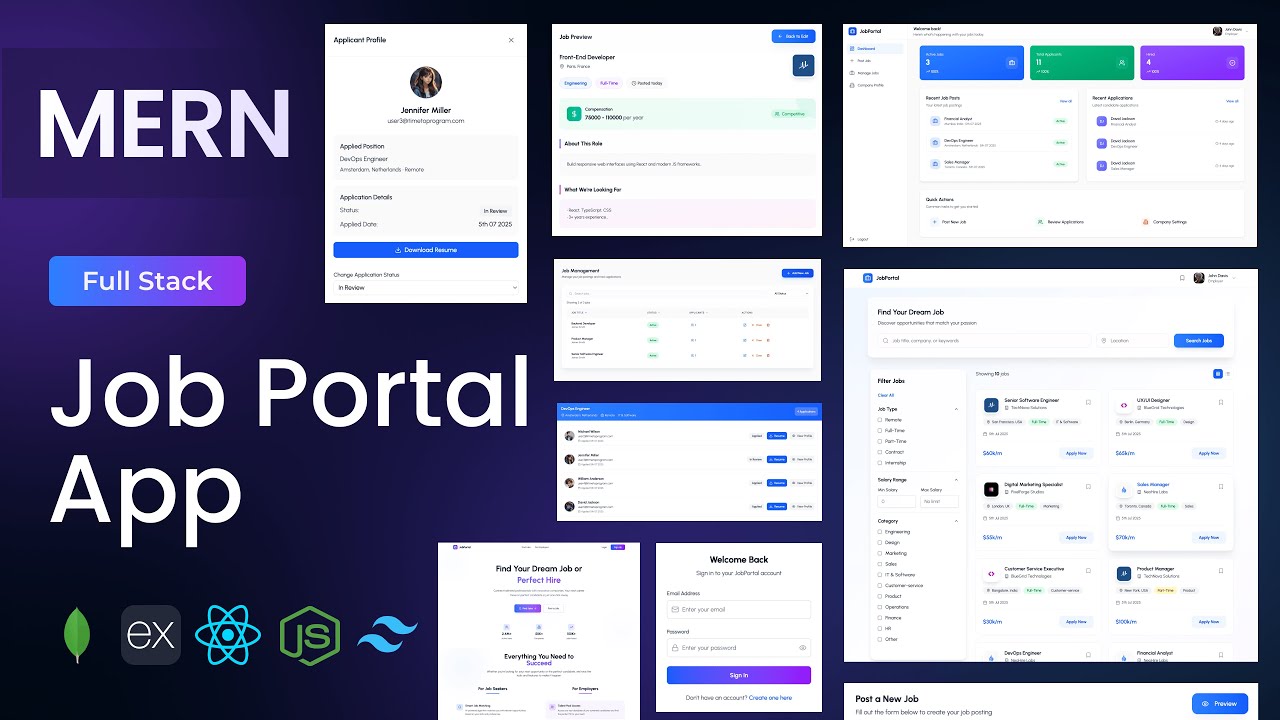
Build a full-stack Job Portal application using MongoDB, Express, React, and Node.js. Features dual role-based dashboards for Employers and Job Seekers, JWT authentication, job posting with full CRUD, resume upload and download, job applications with status tracking, saved jobs bookmarking, company profiles, job search with category and location filters, and dashboard analytics — the most ambitious MERN project in the series at over 7 hours.
MongoDBExpressReactNode.jsJWTTailwind

What You'll Build

Secure login & sign-up with JWT — Employer and Job Seeker roles
Landing page with hero, features, analytics, and footer sections
Employer dashboard with analytics overview
Create job postings with full form and live preview
Manage jobs — edit, delete, and close listings
View all applicants per job with resume download
Employer company profile — logo and description
Edit employer profile page
Job Seeker dashboard with job browsing and search
Search and filter jobs by category, company, and location
Job details page with full posting information
Apply to jobs with resume upload
View application status for all submitted applications
Save jobs for later with bookmarking
Saved jobs page for quick access
Upload, update, and delete resume for job seekers
Update job seeker profile page
Fully responsive across desktop, tablet, and mobile

What You'll Learn

MERN stack architecture with two distinct role-based user flows
Four-schema MongoDB design — users, jobs, applications, saved jobs
Role-based JWT authentication — Employer vs Job Seeker access
Job CRUD API with search, filter, and pagination support
Application flow — submit, track status, employer review
Resume upload, download, and delete with Express
Dashboard analytics API with MongoDB aggregations
Role-aware React routing — different dashboards per user type
Job search with multi-filter UI — category, company, location
Company profile management with image upload
Saved jobs system design — schema, API, and UI
Job posting preview component before publishing
Tailwind CSS v4 multi-page layout design
Auth Context setup for global role-aware state in React

Video Chapters

0:00Demo of Job Portal AppChapter 1
12:56Setting up the React appChapter 2
15:10Configuring Tailwind CSS v4Chapter 3
17:32Creating project structure — files & foldersChapter 4
21:53Defining app routesChapter 5
25:29Landing page — header componentChapter 6
31:04Hero sectionChapter 7
39:30Features sectionChapter 8
47:15Analytics sectionChapter 9
52:17Footer componentChapter 10
55:38Creating the login componentChapter 11
1:09:27Creating the sign-up componentChapter 12
1:33:49Backend setup & project structureChapter 13
1:39:27Connecting to MongoDBChapter 14
1:41:45Creating User schemaChapter 15
1:43:25Creating Job schemaChapter 16
1:44:38Creating Saved Job schemaChapter 17
1:45:18Creating Job Application schemaChapter 18
1:47:06Authentication APIs — login, signup, profile info, image uploadChapter 19
1:59:33User APIs — update profile, delete resume, public profileChapter 20
2:07:27Job APIs — create, read, update, delete jobsChapter 21
2:23:29Application APIs — apply, view applications, update statusChapter 22
2:36:21Saved Job APIsChapter 23
2:41:40Dashboard analytics APIChapter 24
2:47:54Defining API endpointsChapter 25
2:48:14Creating Axios instanceChapter 26
2:51:43Setting up Auth ContextChapter 27
2:55:13Integrating login APIChapter 28
2:59:52Integrating sign-up APIChapter 29
3:06:02Employer dashboard pageChapter 30
3:47:22Create job posting formChapter 31
4:18:18Job posting preview componentChapter 32
4:30:40Manage jobs pageChapter 33
5:04:44View applications pageChapter 34
5:32:21Employer profile details pageChapter 35
5:44:20Edit employer profile pageChapter 36
5:56:44Job Seeker dashboard pageChapter 37
6:14:06Search header componentChapter 38
6:23:56Job card componentChapter 39
6:31:57Filter content componentChapter 40
6:42:17Job details pageChapter 41
6:56:42Saved jobs pageChapter 42
7:06:15Update job seeker profile pageChapter 43

Tech Stack

MongoDBFour-schema architecture — users, jobs, saved jobs, and job applications — designed for a multi-role platform with relational-style queries via Mongoose populate.
ExpressPowers the full REST API — auth, user profile management, job CRUD, application flow, saved jobs, resume upload/delete, and dashboard analytics.
ReactDrives two completely separate dashboard experiences — Employer (post jobs, manage applicants) and Job Seeker (browse, apply, save jobs) — from a single React app with role-based routing.
Node.jsServer runtime handling all API requests, MongoDB connection, resume file serving, and dashboard aggregation queries.
JWTSecures all protected routes with role-aware tokens — Employer and Job Seeker roles unlock different dashboard views and API endpoints.
TailwindTailwind CSS v4 used across the landing page, both dashboards, job cards, application views, and all form and profile pages.
💬

Frequently Asked Questions

What makes this the most advanced project in the series?

At 7h 21m, this is the longest tutorial on the channel. It introduces four MongoDB schemas, two completely separate role-based dashboards within one React app, a full job application lifecycle (post → apply → review → status update), resume file management, and dashboard analytics — patterns used in production SaaS platforms.

How do the Employer and Job Seeker dashboards share the same React app?

The Auth Context stores the user's role from the JWT payload. React Router uses this role to render either the Employer or Job Seeker dashboard after login — no separate frontend builds needed. Role-protected routes prevent cross-role access.

How does the resume upload and download work?

Job Seekers upload their resume via the profile update page — stored on the Express server using a file upload middleware. Employers can download applicant resumes directly from the View Applications page via a server-served file endpoint.

Can employers see who applied before closing a job?

Yes — the View Applications page shows all applicants for each job posting, including their profile info and a resume download link. Employers can also update the application status (reviewed, shortlisted, rejected) per applicant.

What prior knowledge do I need?

This is the most advanced project in the series. Completing intermediate projects like the Task Manager or Expense Tracker App first is strongly recommended. Familiarity with role-based auth, React context, multi-schema MongoDB, and Express API design will make the first three hours much easier to follow.

What is included in the source code?

You get the full React frontend (landing page, employer dashboard, job seeker dashboard), Express backend, four Mongoose schemas, Auth Context, API endpoint config, a .env.example, and a README with local setup and deployment instructions.