Intermediate4h 52m

Full Stack Task Manager App with MERN Stack

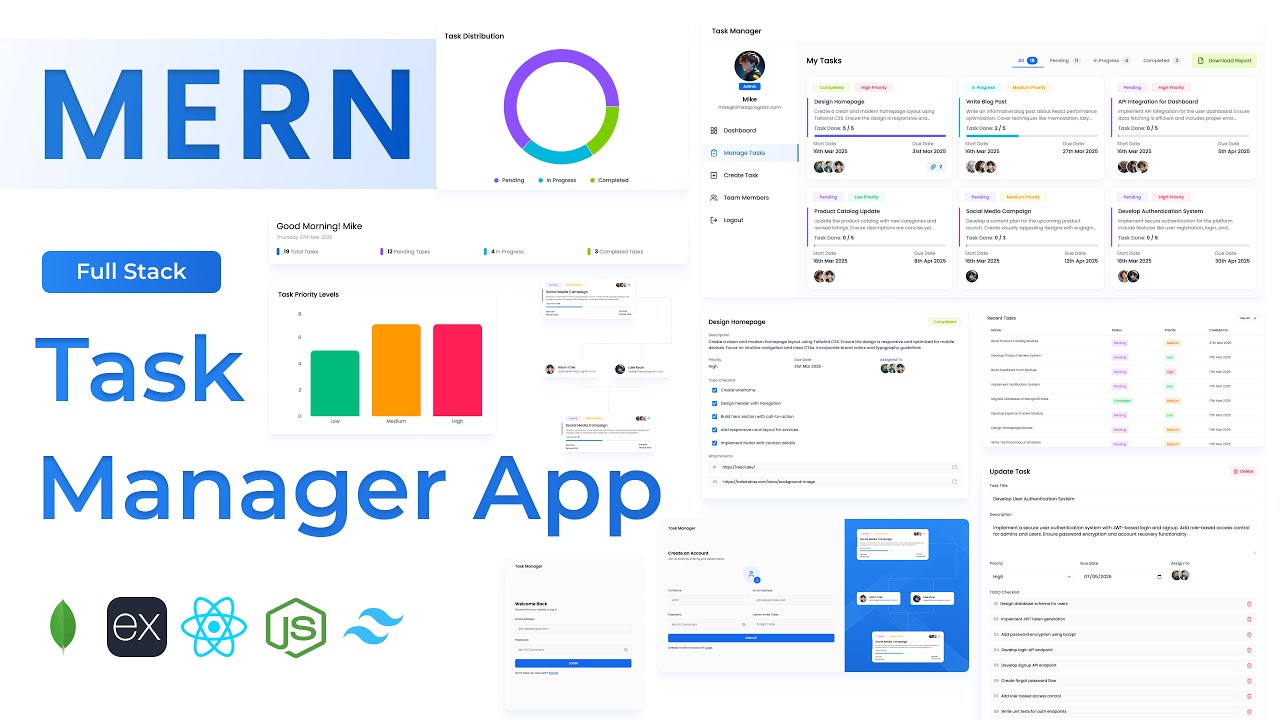
Build a full-stack Task Manager application using MongoDB, Express, React, and Node.js. Features role-based dashboards for admins and users, task creation with priorities and due dates, automated status updates via checklist, team task assignment, pie and bar chart analytics, report downloads, and a fully responsive sidebar UI — a production-quality project management tool built from scratch.
MongoDBExpressReactNode.jsJWTTailwind

What You'll Build

User signup & login with JWT authentication
Admin dashboard with task insights and summary cards
Create tasks with due dates, priorities, and attachment links
Assign tasks to multiple team members
Automated task status updates based on checklist completion
Priority & progress tracking (Low, Medium, High)
Task distribution pie chart and priority bar chart
Manage tasks page with tab-based filters and grid layout
Update and delete tasks with full detail view
Manage users page with user card UI
Download all-user task report and detailed task report
User dashboard with assigned tasks and personal charts
My Tasks page with task detail and todo checklist
Mobile responsive UI with sidebar navigation

What You'll Learn

MERN stack architecture with role-based access control
Designing MongoDB schemas for tasks, checklists, and team assignments
Building admin vs user dashboards from a single React app
Automated status logic driven by checklist state
Pie and bar chart integration for task analytics
Task report generation and download from Express
Tab filter UI for task status categories
Form validation for complex multi-field create task form
Axios instance with centralised API path configuration
Tailwind CSS v4 setup and responsive sidebar layout

Video Chapters

0:00Demo of Task Manager AppChapter 1
11:30Setting up React appChapter 2
13:46Tailwind CSS v4 setupChapter 3
17:02Creating required files and foldersChapter 4
18:36Defining app routesChapter 5
24:01Backend project setupChapter 6
28:33Configuring MongoDBChapter 7
31:13Defining User MongoDB schemaChapter 8
32:03Defining Task MongoDB schemaChapter 9
33:39Authentication APIs — login, sign-up, get user, profile image uploadChapter 10
52:21User management APIs — get all users, get specific userChapter 11
59:14Task management APIs — get all, create, update, update status, etc.Chapter 12
1:27:23Report generation APIsChapter 13
1:36:34Building the login form UIChapter 14
1:49:27Building the sign-up form UIChapter 15
1:58:56Defining API pathsChapter 16
1:59:33Creating Axios instanceChapter 17
2:01:28Integrating login APIChapter 18
2:11:10Integrating sign-up APIChapter 19
2:19:38Dashboard page layoutChapter 20
2:28:57API call to fetch dashboard dataChapter 21
2:31:00Creating summary sectionChapter 22
2:38:09Creating recent tasks sectionChapter 23
2:45:33Task distribution section — pie chartChapter 24
2:53:22Task priority levels section — bar chartChapter 25
2:57:39Building the create task formChapter 26
3:33:44Validating create task formChapter 27
3:35:48Integrating create task APIChapter 28
3:41:13API call to get all tasksChapter 29
3:48:30Creating tab filtersChapter 30
3:53:22Displaying task cards in a gridChapter 31
4:03:24Get task details by task IDChapter 32
4:05:31Integrating update task APIChapter 33
4:08:26Integrating delete task APIChapter 34
4:12:51Get all user details API callChapter 35
4:15:12User card UIChapter 36
4:19:47Download all-users task reportChapter 37
4:21:27Download detailed task reportChapter 38
4:25:58User dashboard with summary cards and chartsChapter 39
4:28:45My Tasks page UIChapter 40
4:31:32View task details pageChapter 41
4:47:45Update task status and todo checklist API integrationChapter 42

Tech Stack

MongoDBStores users, tasks, checklists, priorities, and attachments with flexible document schemas designed for team collaboration.
ExpressPowers the REST API — auth, user management, task CRUD, status updates, checklist toggling, and report generation endpoints.
ReactDrives the full UI — admin and user dashboards, task cards with tab filters, create/update forms, charts, and task detail views.
Node.jsServer runtime handling API requests, MongoDB connection, and report file generation for download.
JWTSecures all routes with role-aware authentication — admin users get full task and user management access, regular users see only their assigned tasks.
TailwindTailwind CSS v4 used for a clean, responsive sidebar dashboard layout consistent across desktop, tablet, and mobile.
💬

Frequently Asked Questions

What is the difference between the admin and user dashboards?

Admin users see all tasks across the team, can create and assign tasks to any user, manage all users, and download full reports. Regular users see only their assigned tasks, their own checklist progress, and personal charts — all controlled via JWT role-based access.

How does the automated task status update work?

Each task has a todo checklist. As the user ticks off checklist items, the task status updates automatically — for example moving from "In Progress" to "Completed" when all items are checked. This logic is handled in the Express API and reflected in real time on the frontend.

What prior knowledge do I need for this project?

Intermediate MERN experience is recommended. Completing a project like the Expense Tracker or Travel Story App first will make this much easier to follow, as this project introduces team-based data relationships and role-based UI logic.

How does task assignment to multiple users work?

Tasks store an array of assigned user IDs in MongoDB. The create task form lets the admin select multiple team members from the user list, and the backend populates user details when fetching tasks.

What report formats are available for download?

The tutorial covers two reports — an all-users task summary report and a detailed individual task report, both generated server-side in Express and downloaded from the frontend via Axios.

What is included in the source code?

You get the full React frontend, Express backend, Mongoose schemas for users and tasks, API path config, a .env.example, and a README with local setup and deployment instructions.