Intermediate4h 35m

Full Stack Travel Story App with MERN Stack

Build a full-stack Travel Story application using MongoDB, Express, React, and Node.js. Features JWT authentication, image uploads with Multer, story creation and editing, date range filtering, search, and a pin-to-top favourite system — a great intermediate MERN project with real-world file handling.
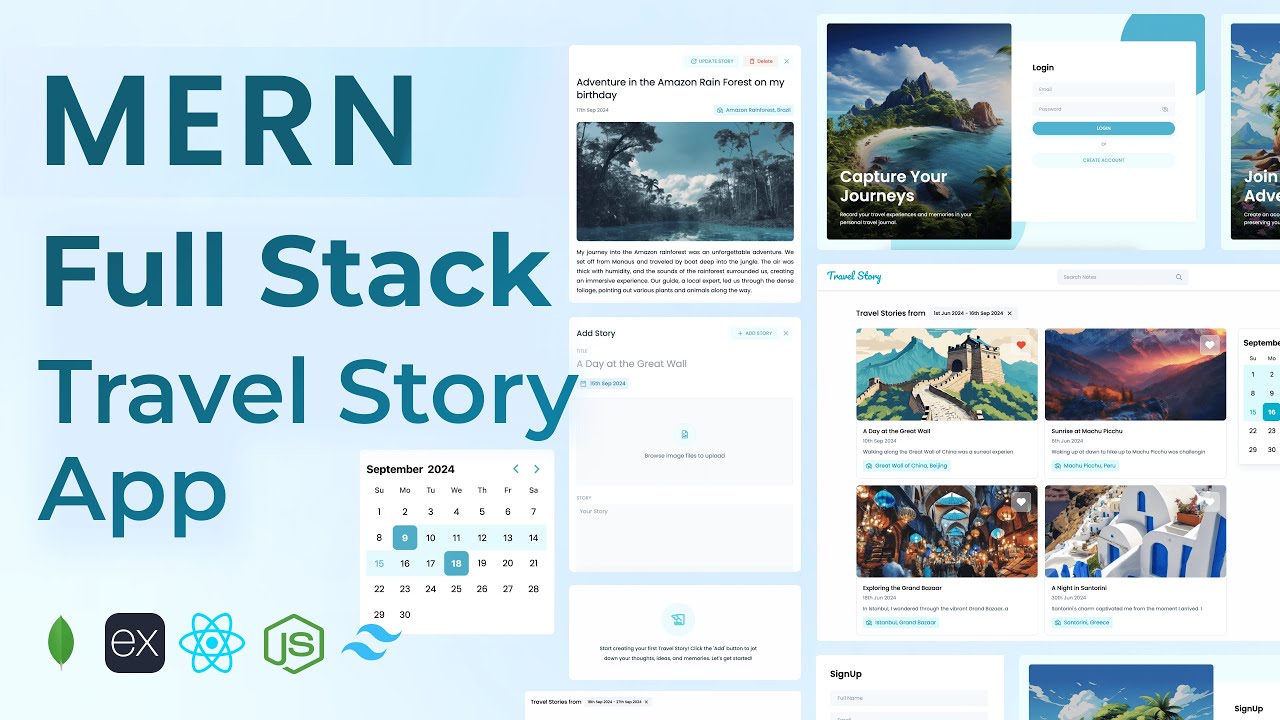
MongoDBExpressReactNode.jsJWTMulterTailwind

What You'll Build

User signup & login with JWT authentication
Create travel stories with a featured image upload
Edit existing travel stories and swap images
Delete travel story and its associated image from server
Pin favourite stories to the top
Search stories by keyword
Filter stories by custom date range
View story details in a popup modal
Responsive home page with story card grid
Navbar with user profile card

What You'll Learn

MERN stack project setup from scratch with Vite
JWT authentication with protected middleware
File uploads in Node.js using Multer
Serving and deleting static files via Express
Custom image picker component in React
Date selector and date range picker from scratch
Search and date range filter API design
Popup modal for viewing and editing stories
Axios utility instance with auth headers
Organising a large React app with reusable components

Video Chapters

0:00Demo of Travel Story AppChapter 1
4:50Frontend React app setupChapter 2
8:41Tailwind CSS setupChapter 3
11:33React Router DOM installation & setupChapter 4
14:32Backend Node.js Express project setupChapter 5
18:51MongoDB Atlas configurationChapter 6
23:05Creating User schemaChapter 7
24:26Create account APIChapter 8
31:10Login APIChapter 9
35:02Get user API & JWT token authenticationChapter 10
40:04Add travel story APIChapter 11
49:05Get all travel stories APIChapter 12
51:07Image upload API using MulterChapter 13
58:21Delete image APIChapter 14
1:04:15Edit travel story APIChapter 15
1:09:53Delete travel story APIChapter 16
1:13:58Update isFavourite APIChapter 17
1:18:19Search stories APIChapter 18
1:21:58Filter stories by date range APIChapter 19
1:26:12Login screen UIChapter 20
1:42:28Login API integrationChapter 21
1:54:14Sign up screen UIChapter 22
1:57:29Create account API integrationChapter 23
2:01:57Home page UIChapter 24
2:04:55Get user info API integrationChapter 25
2:08:00Navbar profile cardChapter 26
2:14:20Get all stories API integrationChapter 27
2:17:07Travel story card componentChapter 28
2:26:30Update isFavourite functionChapter 29
2:34:14Add / Edit travel story popupChapter 30
2:47:12Date selector componentChapter 31
2:58:34Custom image picker componentChapter 32
3:22:10Add new travel story functionChapter 33
3:24:34Utility function to upload imageChapter 34
3:31:43View travel story popup modalChapter 35
3:45:11Update story functionChapter 36
3:51:20Delete travel story image functionChapter 37
3:58:37Delete story functionChapter 38
4:09:54Search bar componentChapter 39
4:14:05Search stories API integrationChapter 40
4:17:59Date range picker componentChapter 41
4:21:31Filter travel stories by date rangeChapter 42
4:25:35Filter info title componentChapter 43

Tech Stack

MongoDBStores user accounts and travel stories including image paths, dates, and favourite status.
ExpressHandles all REST API routes — auth, story CRUD, image upload/delete, search, and date filtering.
ReactPowers the UI — story cards, add/edit popup, date selector, custom image picker, and filter components.
Node.jsServer runtime running the Express API, serving uploaded images, and connecting to MongoDB Atlas.
JWTSecures all protected API routes; token is verified on every request via an auth middleware.
MulterHandles multipart form data for featured image uploads, stored locally on the server.
TailwindUtility-first CSS for a clean, responsive travel journal UI built entirely without custom stylesheets.
💬

Frequently Asked Questions

What makes this project different from the MERN Notes App?

This project introduces file uploads with Multer, server-side image management (upload and delete), a custom image picker component, and a date range filter — a significant step up in complexity from a basic CRUD app.

How are images stored in this project?

Images are uploaded via Multer and stored on the Express server's local filesystem. The image path is saved in MongoDB and served as a static file via Express. The tutorial also covers deleting the file from the server when a story is removed.

What prior knowledge do I need?

Completing a beginner MERN project like the Notes App is recommended. You should be comfortable with React components, useState, and basic Express routes before starting this one.

What is included in the source code?

You get the full React frontend, Express backend, Mongoose models, a .env.example file, and a README with local setup and deployment instructions.

Can I replace local image storage with Cloudinary?

Yes — the image upload logic is isolated in a utility function, making it straightforward to swap Multer local storage for Cloudinary or AWS S3 after completing the tutorial.

Is the date range filter built from scratch?

Yes — both the date selector and date range picker are custom React components built from scratch in the tutorial, so you learn exactly how they work rather than relying on a third-party library.